Skull Cap Trend AI Video: The Glow-Up, the Song and How to Make Yours
Make a skull cap trend AI video from one photo. See what the TikTok skull cap glow-up is, which song it uses, two actual 11-second results, and how to choose a photo.
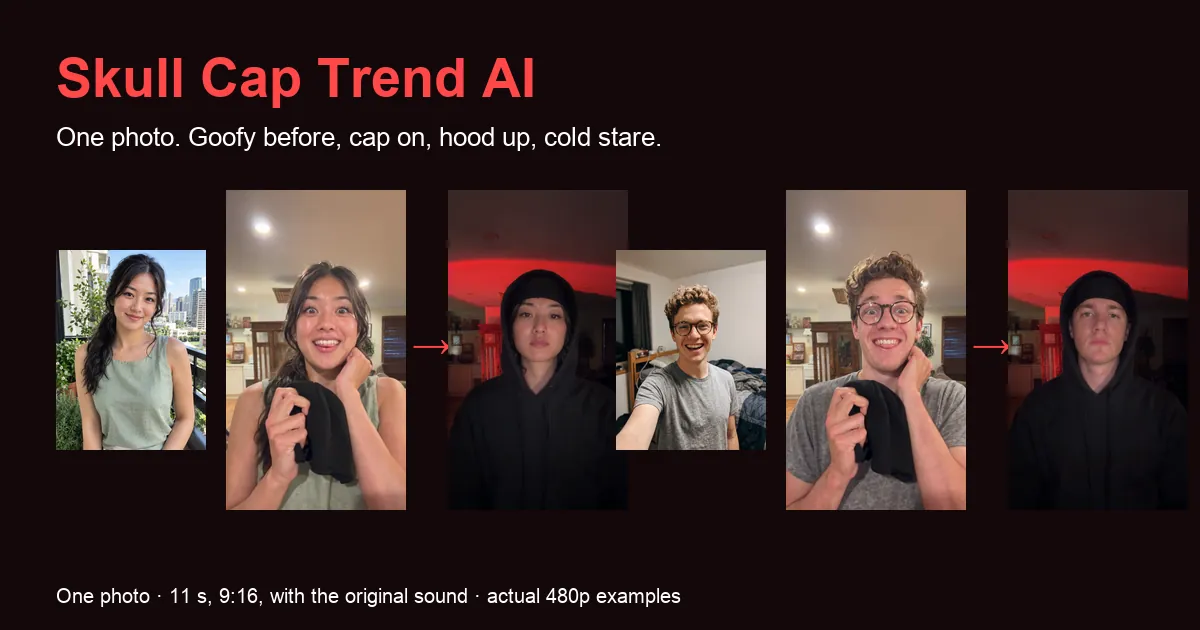
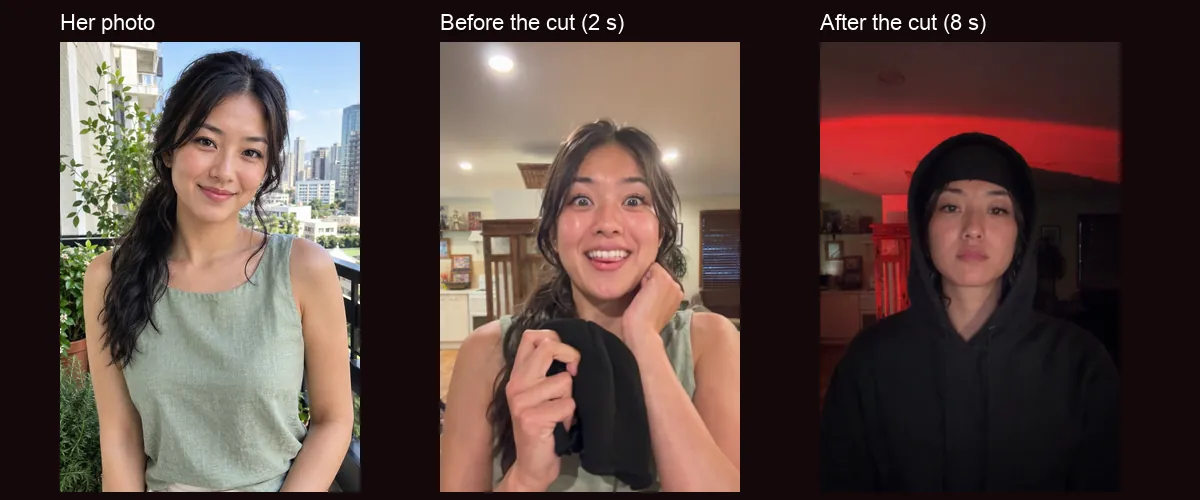
A skull cap trend AI video puts the adult in your photo into the TikTok skull cap glow-up that took over feeds in October 2026. You start goofy in a bright room, holding a black knit skull cap at your chest with a wide grin. You pull the cap on, the beat drops, and a hard cut lands you in a dark room lit red, hood up over the cap, glasses off, staring into the lens like nothing is funny. You supply one photograph; the finished clip runs about eleven seconds in 9:16 with the original sound.
This guide explains the trend and its caption, names the song, shows two actual results next to the photos that made them, and covers which photo works best and how to post the clip. You can watch both examples before paying on the Skull Cap Trend AI page.
What is the skull cap trend?
The skull cap trend is a two-shot glow-up joke. Most posts carry the caption "How dudes act 0.01 seconds after putting on a skull cap". The idea is that one plain black beanie instantly flips your whole personality: from awkward, smiley and a little nerdy to mysterious, serious and far too cool to smile. The tiny time in the caption is the punchline, and the hard cut is what makes the change look instant.
The before shot is a phone selfie in a bright, ordinary room. The person grins, pulls faces, often wears glasses, and shows off the skull cap in their hands. The after shot is the same person in the dark with the cap pulled low, a hood up over it, the glasses gone and a cold stare. Many after shots add a coloured light behind them, often red. Men, women, parents and couples have all done it.
The "skull cap" in this trend is a black knit beanie, the kind also called a skully. It is not a kufi, a yarmulke or another religious cap, and it is not a skull-print hat. People write the name as skull cap, skullcap or skully trend; they all mean the same glow-up.
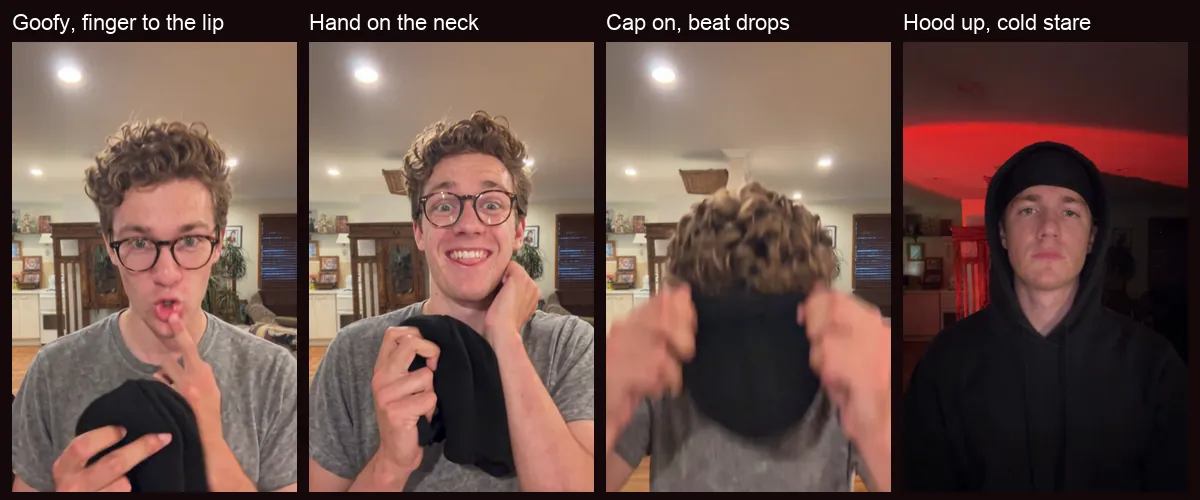
The skull cap trend song
The sound is Bryson Tiller's verse from DJ Khaled's "Wild Thoughts", featuring Rihanna. On TikTok it is usually posted as "original sound - SoulReligion". The goofy half plays over the build-up, and the cut to the dark room lands on the beat drop.
Every video made here already has that sound in the file, timed so the cut hits the drop. You do not need to choose a sound or line anything up.
Two actual skull cap trend AI video examples
We tested two very different people. The first is a woman with long dark hair in a loose braid, in a sage-green sleeveless top, without glasses. The second is a man with thick curly hair and round tortoiseshell glasses, in a grey T-shirt. Both photos are AI-generated adults made for testing; both videos are actual 480p generations with the original sound added afterwards.
A finished clip alone does not tell you how close the result stays to the person in the photo. Below, each photo sits next to its result.
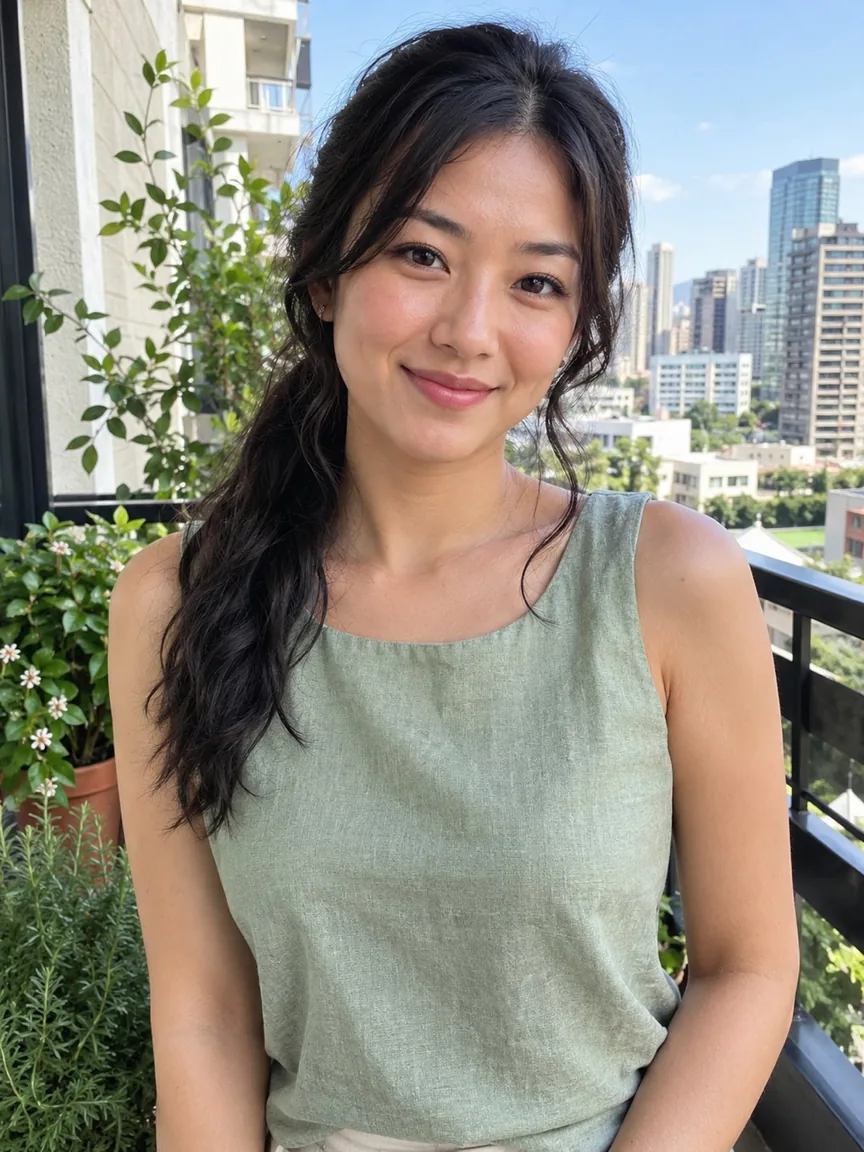 Photo 1
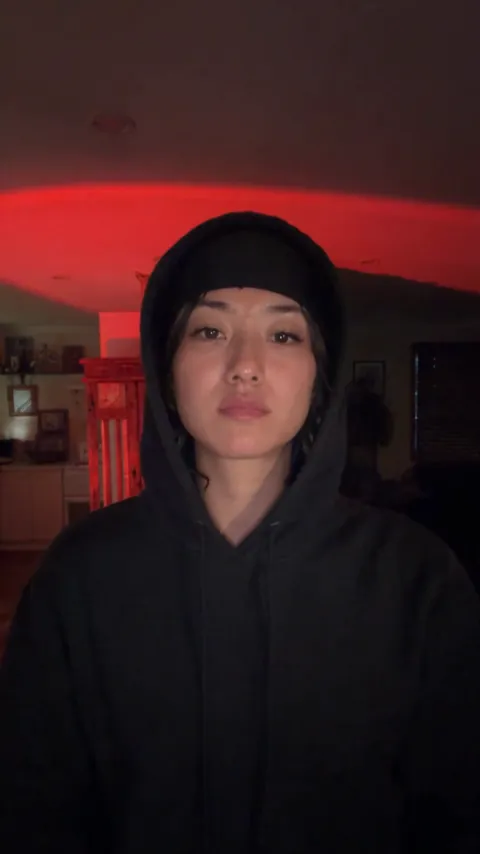 The video
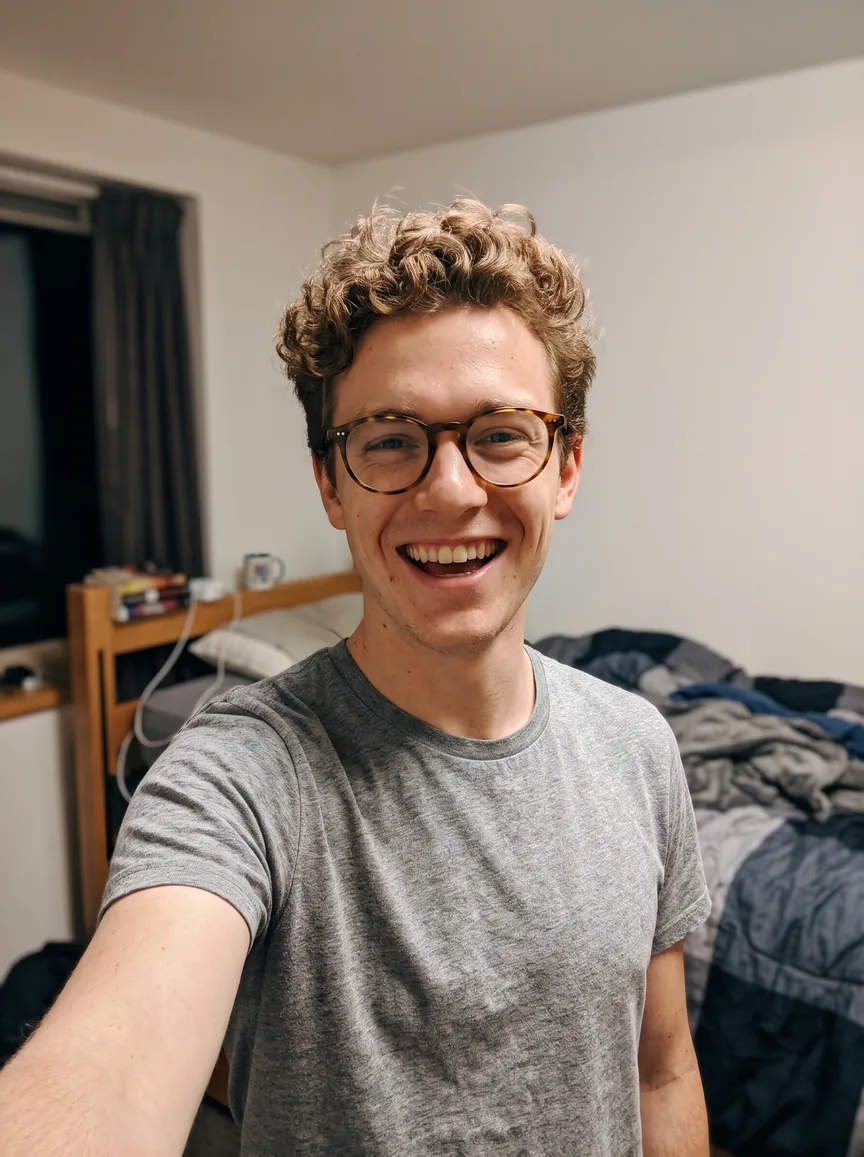 Photo 1
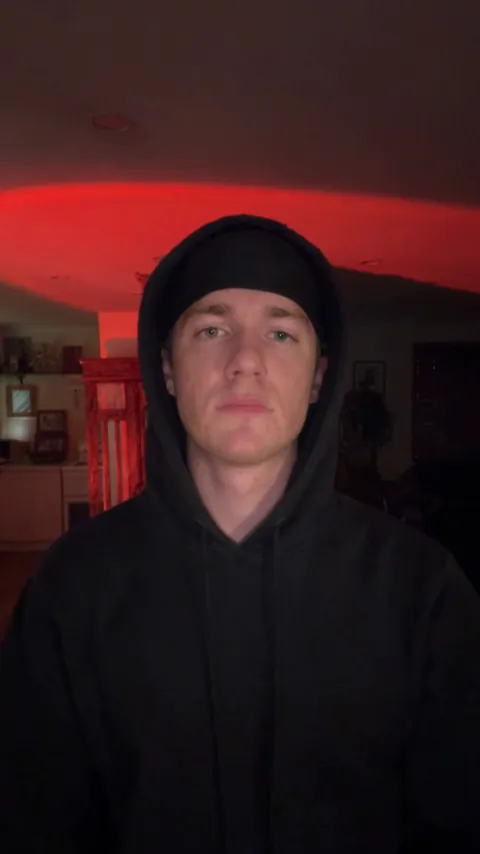 The video
Choose a photo for your skull cap trend AI video
Start with one clear adult. The face should be readable, mostly towards the camera and free of large obstructions. An ordinary phone selfie in daylight usually works better than a dramatic photo with deep shadows or a heavy filter. You can smile in the photo; the goofy faces and the cold stare come from the trend itself.
Your photo supplies the face, hair, top and glasses. Wear the top you want in the goofy half. If you wear glasses in the photo, you keep that exact pair before the cut and take them off after it, just like the trend. If you do not, your eyes stay uncovered in both halves. Long hair stays long in the before shot and is tucked into the cap and hood in the after shot.
You do not need your own skull cap, hoodie, red light or second outfit; the video adds all of them. Avoid sunglasses, a hand or phone covering the face, a head turned away, heavy blur and group shots. Photos of children, of several people or with no visible person are turned away before generation, and the credits return to your balance.
Make a skull cap trend AI video step by step
Open the generator and add your photo. You need only one upload. The rooms, moves, cut and length are fixed, so there is no prompt to write, no template to download and no app to install.
Choose 480p, 720p or 1080p; 720p is the default. These options change output resolution and keep the same scene, timing and sound. Both public examples are labelled 480p because that was the setting of the tests.
Continue to the payment panel. It shows the price for one video and the credit packs. After payment, the photo is checked before generation. If it is unsuitable, the credits return to your balance and you can pick another photo. The finished video gets the original sound before delivery.
How to film and edit the skull cap trend in CapCut, for free
If you would rather film it, you need any black beanie (a durag or rolled beanie works if you have no skull cap), a dark hoodie and a dark corner. Film a goofy selfie holding the cap, then duck and pull it on while covering the lens. Film the second shot in the dark with the hood up, glasses off and a straight face.
In CapCut, put both clips on the timeline with "original sound - SoulReligion", split the first clip where you duck, and line the start of the second clip up with the beat drop. A short flash or shake transition of a fraction of a second hides the join, and a slow zoom on the stare sells the reveal. There is no official TikTok filter that does this for you.
A skull cap trend AI video skips the costume, the filming and the editing: one selfie becomes both halves, already cut on the beat, with no app to download.
Price, waiting time and posting
A single video costs $6.99 at 480p, $9.99 at 720p and $14.99 at 1080p, or twenty, thirty and forty-five credits from a pack. There is no subscription and no free personalized preview for this trend; the public examples stay available to watch.
Allow about fifteen minutes including processing. Our three 480p tests each took about four minutes on the video model, before the sound was added. That is a recorded observation, not a delivery promise; queues and the resolution you choose change the wait. You can close the tab, and we email you when the video is ready.
The 9:16 MP4 fits TikTok, Reels and Shorts without cropping and has no watermark. To have your post listed under the trend sound as well, add "original sound - SoulReligion" in TikTok's sound picker and lower the clip's own volume so the beat is not doubled.
Check your skull cap trend AI video before you post
Watch the whole clip with sound. The goofy half shows whether your face, hair and top read as you up close. The duck at about four seconds is fast and blurry by design. In the after half, look at the face under the hood: a few strands of hair can show at the temples, and 480p looks soft next to a phone camera. Expressions follow the trend rather than your photo, and higher resolution adds detail but cannot promise an exact likeness.
Label your post as AI-generated and use only photos you have permission to upload. This is a fan-made meme tool, not affiliated with TikTok or the creators who started the trend. For order questions or rights concerns, contact support@airapduo.io.
Skull cap trend AI video questions
What does "0.01 seconds after putting on a skull cap" mean?
It is the joke of the whole trend: a single beanie supposedly turns a goofy person into a cold, mysterious one instantly. The hard cut on the beat drop makes the switch look like it took no time at all.
Can girls, couples or pets do it?
Girls, yes: the long-braid example is a woman, and long hair is tucked into the cap and hood after the cut. The video has one person, so a couple makes one each and posts them side by side. Pets are not supported yet.
Can I change the rooms or the moves?
No. The bright room, the red-lit dark room, the cap and the cut are what make the trend recognizable. You choose the photo and the resolution.
Do I need to look serious in my photo?
No. A calm or smiling, clear photo works best. The goofy faces and the cold stare come from the trend itself.