ChatGPT Millionaire AI Video: The Meme, Photo Tips and How to Make Yours
Make a ChatGPT Millionaire AI video from one photo. See two actual 15-second results of the “how I become a millionaire in 30 days” meme, choose a clear photo and compare resolutions.
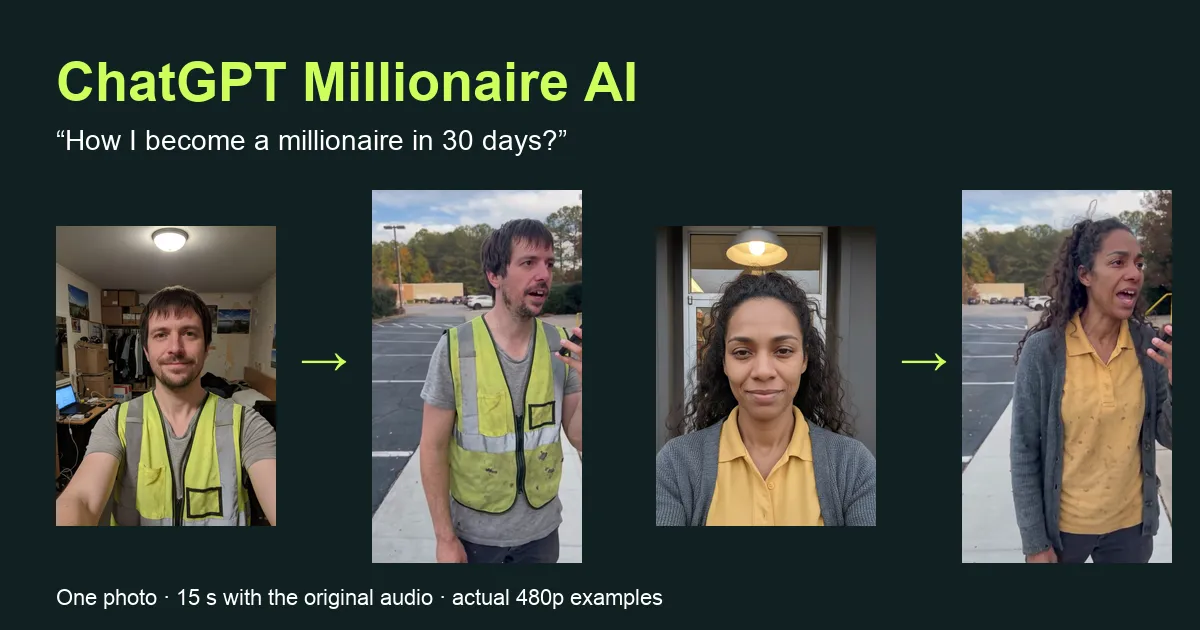
A ChatGPT Millionaire AI video puts the adult in your photo into the parking-lot meme everyone is quoting this month. You walk with your phone at your mouth and ask, “ChatGPT… how I become a millionaire in 30 days?” The phone answers, “Get a job.” You argue back, ask whether there is a way to skip the job, and hear that it is “virtually impossible.” You supply one photograph; the finished clip runs about fifteen seconds in 9:16 with the original audio.
This guide walks through the meme beat by beat, shows two actual results next to the photos that made them, and explains which photo works best, what the resolutions mean and what to check before you post. You can watch both examples before paying on the ChatGPT Millionaire AI page.
What happens in a ChatGPT Millionaire AI video
The original is a short comedy sketch: one continuous handheld shot of a man on a parking-lot sidewalk, talking into his phone as if it were a genie. The joke works because the question is so hopeful and the answer is so flat. Most of the comedy lives in the reaction after “Get a job”: the pause, the look down at the screen and the stubborn second attempt.
The sequence has four beats. In the first four seconds the phone is at your mouth and you ask how to become a millionaire in 30 days. Around the fourth second the phone moves beside your face and the answer arrives. Then you look down, protest and lift the phone again for a follow-up question. In the last few seconds you stare at the screen while the phone delivers its verdict.
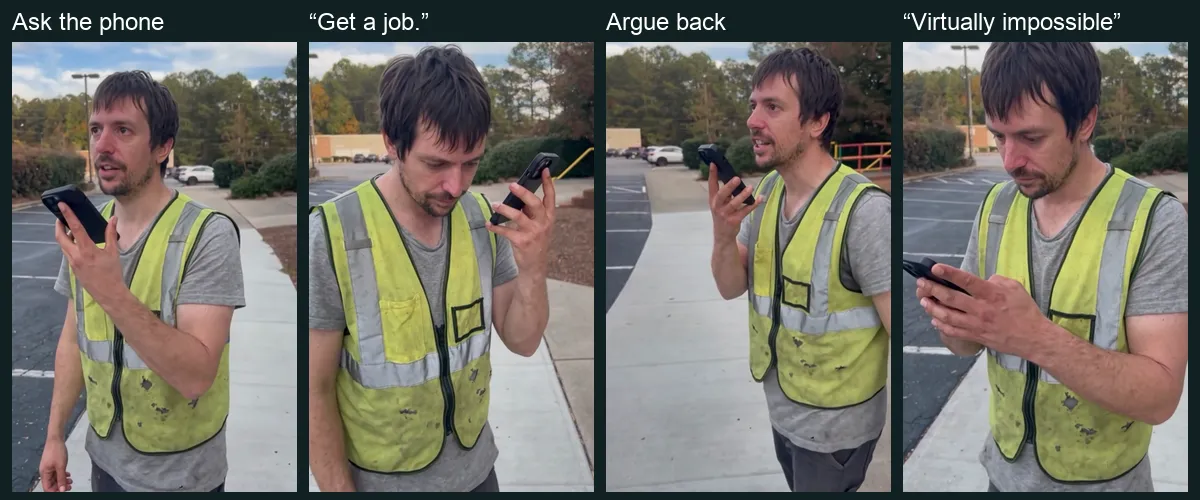
In your ChatGPT Millionaire AI video, your photo replaces the person holding the phone. The sidewalk, trees, parked cars, daylight and camera movement come from the scene, so the timing of every line stays where the original audio expects it. You do not need to hold a phone in your photo or find a parking lot to stand in.
Two actual ChatGPT Millionaire AI video examples
We chose two people the joke fits: working adults who would love a shortcut to money. The first is a delivery worker in a worn hi-vis vest over a stretched grey T-shirt, with shaggy hair and stubble. The second is a fast-food worker in a mustard work polo under a pilled grey cardigan, with long curly hair pulled back. Both photos are AI-generated adults made for testing; both videos are actual 480p generations with the original audio added afterwards.
Most tools that offer this meme show only finished clips, so you cannot judge how close the result stays to the person in the photo. Below, each photo sits next to its result.
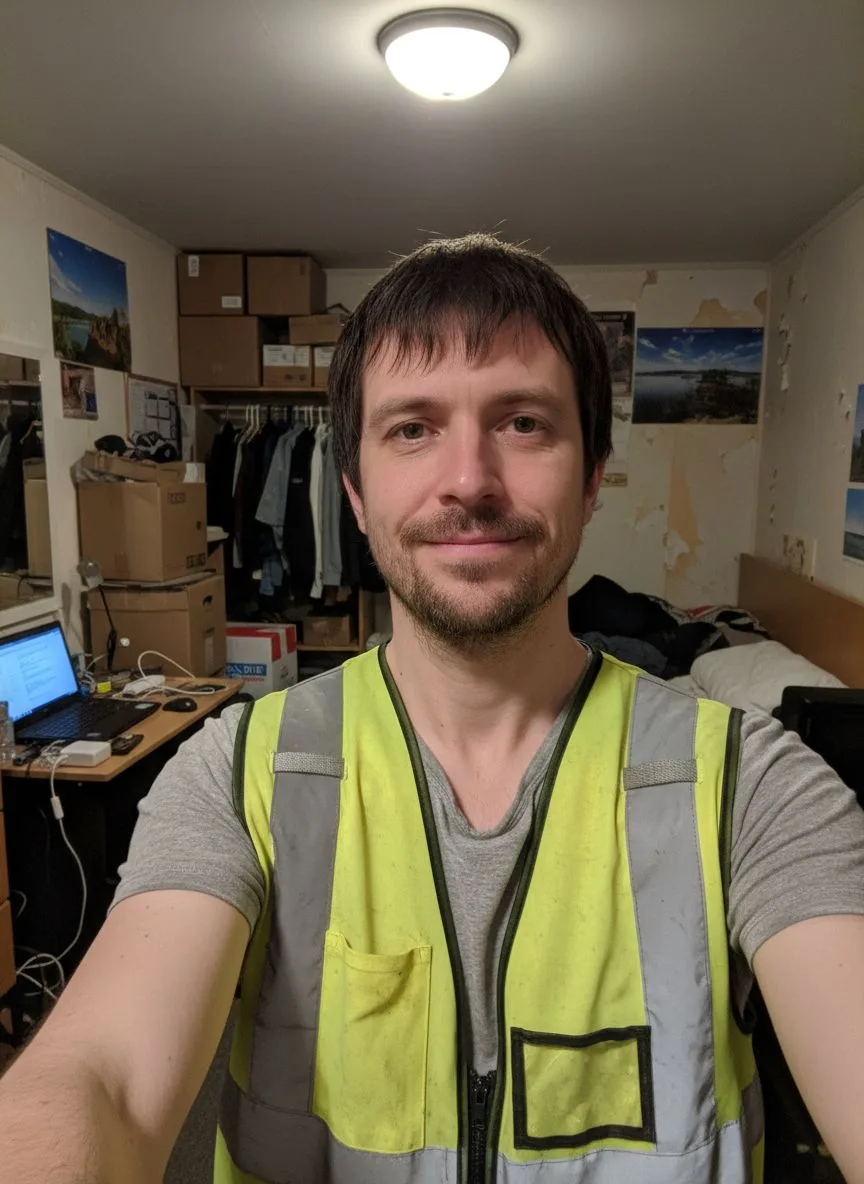 Photo 1
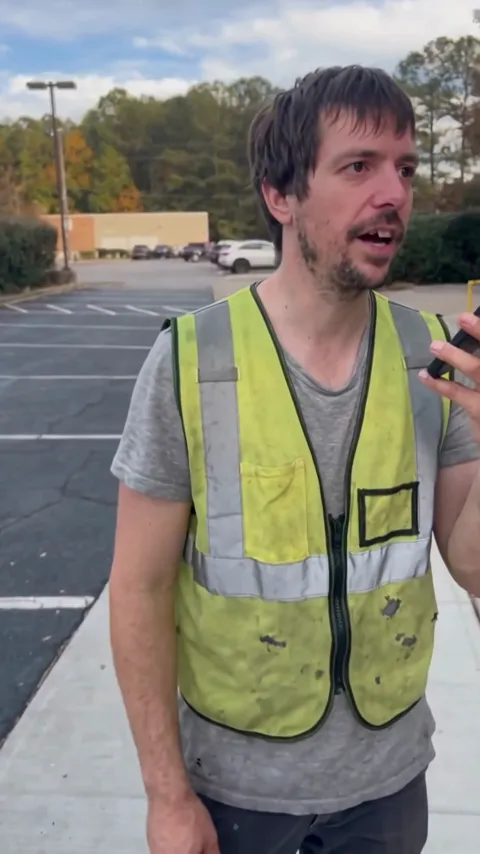 The video
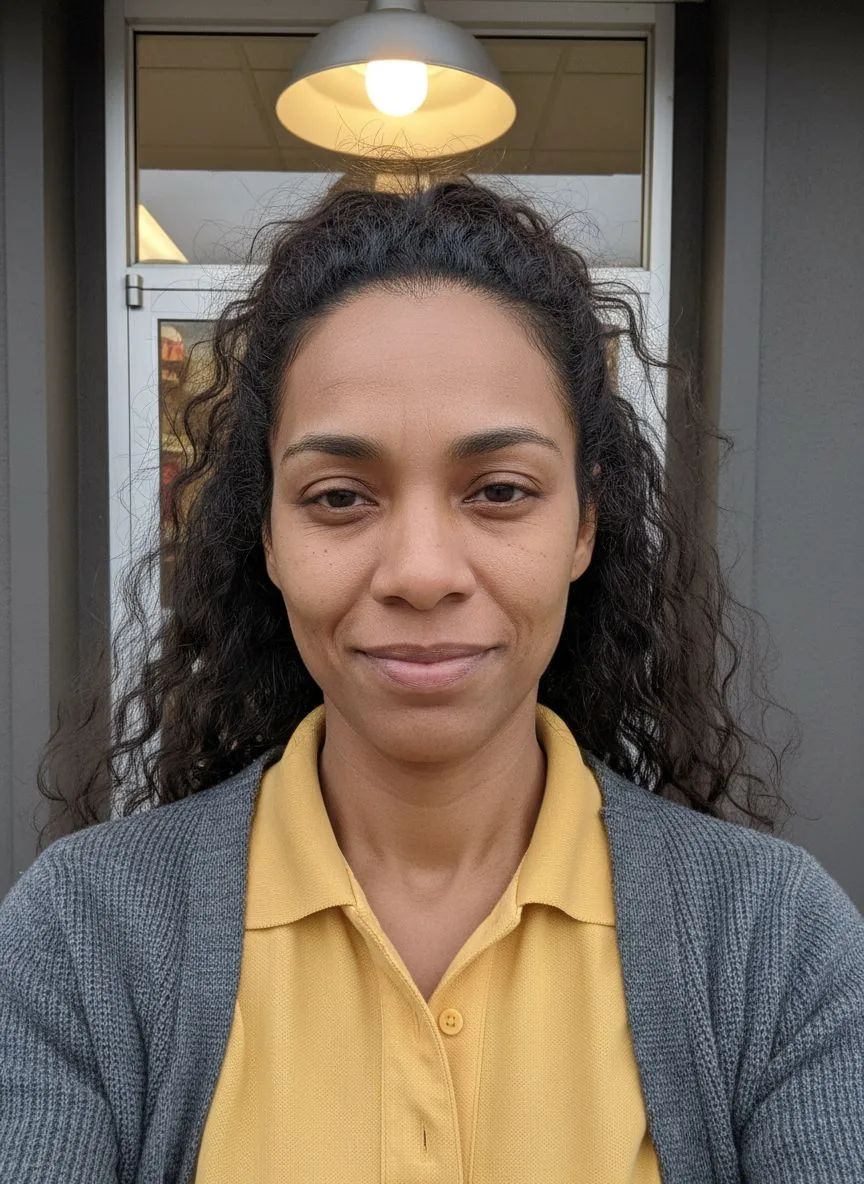 Photo 1
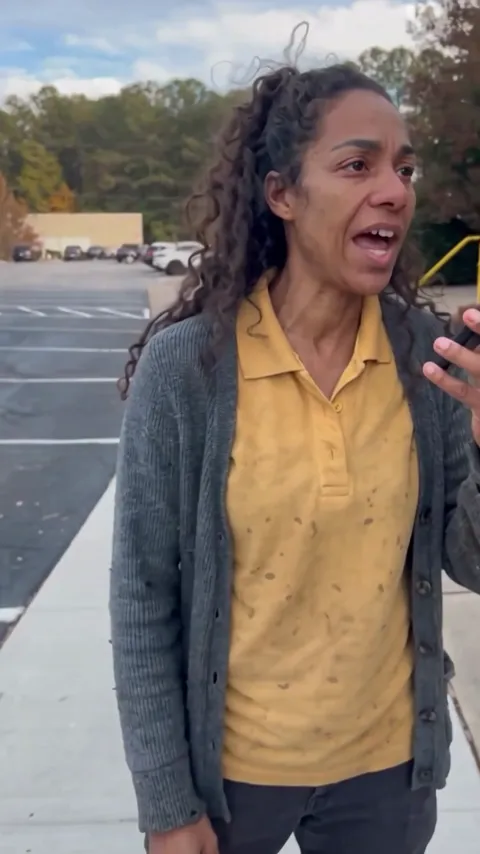 The video
Choose a photo for your ChatGPT Millionaire AI video
Start with one clear adult. The face should be readable, mostly towards the camera and free of large obstructions. Keep the hair inside the frame and wear the outfit you want in the video. An ordinary phone selfie in daylight usually works better than a dramatic photo with deep shadows or a heavy filter.
A selfie or upper-body photo is accepted. A waist-up photo gives the video more of your real outfit, because the model then sees what you are wearing below the collar. Without that, it has to fill in the clothes outside the crop. Glasses and facial hair are fine.
Avoid a hand or phone covering the face, a head turned away, strong overexposure, heavy blur and group shots. Photos of children, of several people or with no visible person are turned away before generation, and the credits return to your balance. The background of your photo is not used, so a bedroom or a restaurant doorway is fine.
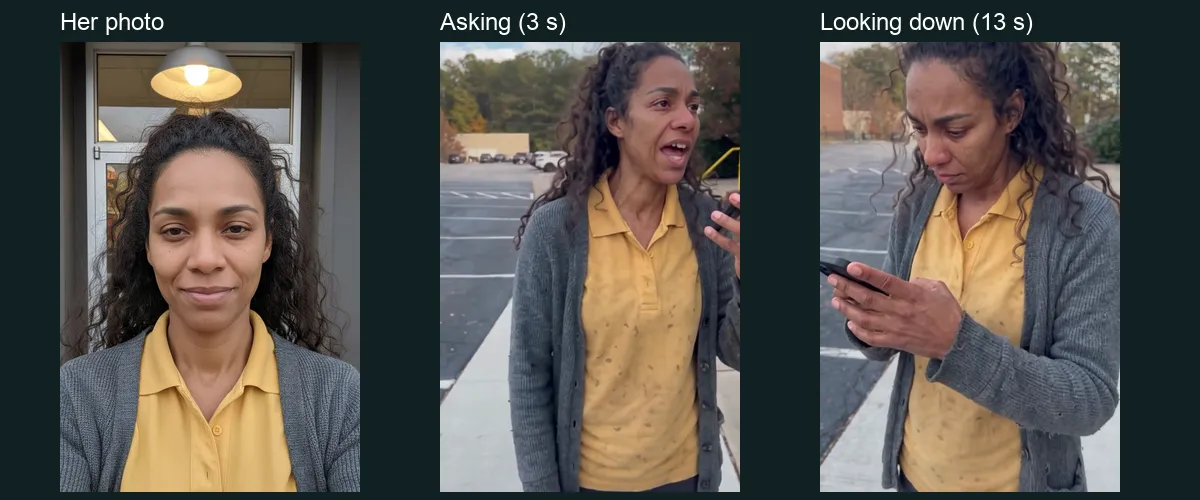
Make a ChatGPT Millionaire AI video step by step
Open the generator and add your photo. You need only one upload. The scene, dialogue and length are fixed, so there is no prompt to write and nothing to record. Watch the complete public example first if you want to be sure this is the meme you mean.
Choose 480p, 720p or 1080p; 720p is the default. These options change output resolution and keep the same scene, timing and audio. Both public examples are labelled 480p because that was the setting of the tests; they are not a demonstration of the higher resolutions.
Continue to the payment panel. It shows the price for one video and the credit packs. After payment, the photo is checked before generation. If it is unsuitable, the credits return to your balance and you can pick another photo. A finished video gets the original audio before delivery.
Resolution, price and waiting time
A single ChatGPT Millionaire AI video costs $6.99 at 480p, $9.99 at 720p and $14.99 at 1080p, or twenty, thirty and forty-five credits from a pack. There is no subscription and no free personalized preview for this meme; the public examples stay available to watch.
Allow about fifteen minutes including processing. Our two 480p tests took four minutes and forty-five seconds for the man and five minutes and one second for the woman on the video model, before the audio was added. That is a recorded observation, not a delivery promise; queues and the resolution you choose change the wait. You can close the tab, and we email you when the video is ready.
If the photo check rejects an image or generation fails, the credits return to your account balance for another attempt. That is different from a refund to your card; contact support if you need help with a charge.
Check your ChatGPT Millionaire AI video before you post
Watch the whole clip with sound. The opening shows whether the face and hair read as you. The look down at the phone shows the top of the head and the hands. The last four seconds are the punchline, so check that the expression and the phone stay natural there.
Generated details can drift. In our woman’s example, a faint dot pattern appeared on a polo that is plain in her photo; the man’s example shows no notable change. Logos, small prints, jewellery and fingers are the details most likely to change. Higher resolution shows more detail but cannot promise an exact likeness.
Sharing the ChatGPT millionaire meme
The 9:16 MP4 fits TikTok, Reels and Shorts without cropping. The original audio is already in the file, so you can post it as it is. If you add a trending sound in an app, listen before publishing so the dialogue is not doubled or muted.
Label your post as AI-generated and use only photos you have permission to upload. This is a fan-made meme tool. It is not affiliated with, endorsed by or connected to OpenAI or ChatGPT, or to the creator of the original sketch. No OpenAI or ChatGPT logo or app screen appears in the video, and the original creator’s face is not used: the scene is built on a neutral stand-in that your photo replaces. For order questions or rights concerns, contact support@airapduo.io.
ChatGPT Millionaire AI video questions
Is this the “chatgpt how do i become a millionaire” meme?
Yes. People search for it as “chatgpt how do i become a millionaire,” “how I become a millionaire in 30 days” or simply the ChatGPT millionaire meme. It is the same parking-lot phone call, the same “Get a job” answer and the same “virtually impossible” ending.
Can I use a pet or two people?
Not yet. This version accepts one adult photo and replaces the one person in the scene. Pet and two-person versions would need their own scene, and we have not made them.
Can I change the words?
No. The dialogue is the original audio of the meme, which is what makes it recognizable. You choose the photo and the resolution; the lines stay the same.
Is the ChatGPT in the video the real app?
No. The phone is an ordinary black phone, and no app screen, logo or interface is shown. The answer you hear is part of the original sketch’s audio, not a live response from any AI assistant.