They turn. They remember. They hug.
AI Zombie Trend
Add a photo of someone you love, or your dog or cat, and we turn it into the AI zombie trend: they become a frightening zombie on a rainy street who lunges at you, then hugs you instead of biting. Add your own photo as well if you want to be in it. Ready in about 5 minutes.


Real result · tap for sound“Two photos: he turns, she survives”
- Free 5-second preview
- Ready in about 5 minutes
- Full video $7.99, or about $3.90 each in a credit pack
AI zombie trend examples
Each AI zombie trend video below started as one or two phone photos. Nobody was filmed and nobody wore make-up: the street, the rain, the zombie look and the warm memory at the end came from the AI. Tap a card for sound. Every face here is AI-generated.
A couple
He turns with glowing white eyes on a rainy street, lunges at her flashlight, and the lunge becomes a hug before it cuts to the same hug in the sun.
Make one like thisYou and your dog
A golden retriever turns into a growling zombie with glowing eyes, leaps at its owner and lands in her arms, then tumbles with her on sunny grass.
Make one like thisJust their photo
From one photo: she turns into a frightening zombie, lunges at the survivor seen from behind and hugs them instead, before a warm memory.
Make one like this
How to do the AI zombie trend
Three steps, and only the first one needs you. The stopwatch under them is our own timing, not a promise. The full guide covers photos, posting and what our test renders got wrong.
Step 1: Add the photo of who turns
Photo 1 is the person or pet who becomes the zombie: a partner, a parent, a best friend, your dog or cat. A clear, front-facing photo works best. Photo 2 is you, and it is optional.
Step 2: Make it and download
Press make. The video renders while you wait, or close the tab and we’ll email you when it’s ready. Most finish in about 5 minutes.
Step 3: Post it with a sound
The video comes with its own soft score. Most people post their AI zombie trend video on TikTok or Reels with an emotional trending sound, turn ours down and tag the person who turned.
Our stopwatch. Timed on the video model, from starting the task to the finished video: our four test videos at 15 seconds, 720p and 9:16 took 2 min 20 s to 8 min 14 s.
Free 5-second preview for some new visitors, then $7.99, or about $3.90 each in a credit pack
Inside an AI zombie trend video: five shots
The turn
They stand alone in the street, then slowly turn around and you see the change.
The light
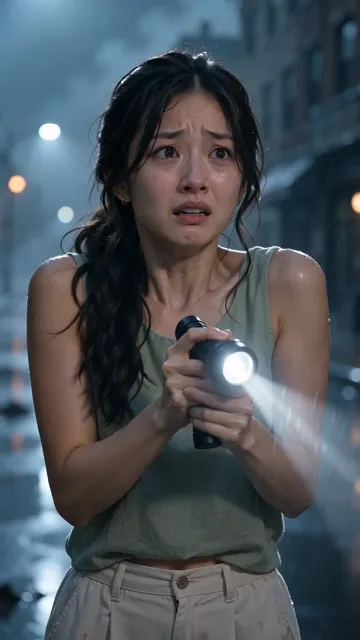
The survivor raises a flashlight with shaking hands, its beam cutting through the rain.
The lunge
It snarls in the flashlight beam, glowing eyes and bared teeth, then suddenly lunges.
The hug
The lunge ends in a hug, not a bite, and the survivor sobs with recognition.
The memory
A match cut: the same movement, years earlier, in warm golden sunlight.
Every AI zombie trend clip tells the same short story: a quiet, rain-soaked city street at dusk, abandoned cars, fog, and two people who find each other again. We kept that story and built it into 15 seconds, vertical, with hard cuts between the shots.
For a few seconds the zombie is genuinely frightening: glowing white eyes, grey skin with dark veins and bared teeth. There is still no blood, no wounds and nothing gory, the face is still the person or pet you love, and the survivor holds a flashlight, not a weapon.
With your partner, your pet or just their photo
Someone you love, and you
Photo 1 turns, photo 2 is you: you raise the light, recognise them and get the hug.
Your dog or cat, and you
Your pet turns, growls with glowing eyes, then leaps into your arms, a real animal on four legs throughout.
Just their photo
Only one photo? The survivor is shown from behind, so the video still works as a gift or a tribute.
The AI zombie trend works for anyone you would miss: a partner, a parent, a brother or sister, a best friend or the dog who waits at the door. What you upload decides who is on screen, and each person keeps their own face and clothes, so nobody’s features get mixed up.
Ways to do the AI zombie trend, compared
Search for the AI zombie trend and you’ll find four kinds of tool. Here is what each one asks of you.
| One or two photos, this page | Video app templates | Prompt it yourself | Other photo sites | |
|---|---|---|---|---|
| You start with | One photo, two if you want to be in it | Photos plus a template | Photos plus a long prompt | One or two photos |
| The story | Five shots with a memory at the end | Depends on the template | Whatever your prompt gets | Often one or two shots |
| The sound | An original score | The template’s track | Depends on the model | Often silent |
| A pet as the zombie | Yes | If the template allows | If you prompt it | Some sites |
| Cost | $7.99, or about $3.90 in a credit pack | Free or a subscription | Credits on the model | Credits or a plan |
Checked on 5 October 2026 against each product’s own pages.
Is the AI zombie trend free?
Free preview
$0
- 5 seconds, low-res
- Some new visitors, with Google sign-in
- One per person, no download
One video
from $7.99
- Pay once for the video you made
- Price set by its size in credits
Credit packs
from $14.99
- 50 credits to start
- A default video is 13 credits
- Credits never expire
Free 5-second preview for some new visitors, then $7.99, or about $3.90 each in a credit pack
Partly. Some new visitors get a free 5-second, low-res preview after signing in with Google: the lunge and the hug. It’s one per person and can’t be downloaded.
The full 15-second AI zombie trend video is 13 credits at the default quality, $7.99 on its own, or out of a credit pack from $14.99. No subscription, and a failed render costs nothing. See every price.
Before you upload
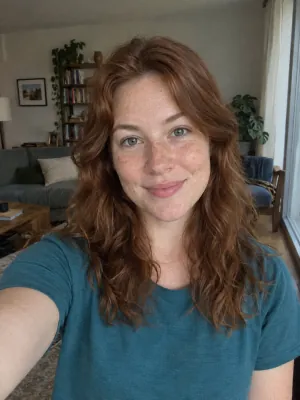
Works: One person, straight on, even light
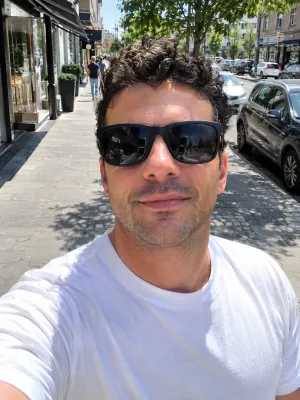
Avoid: Sunglasses
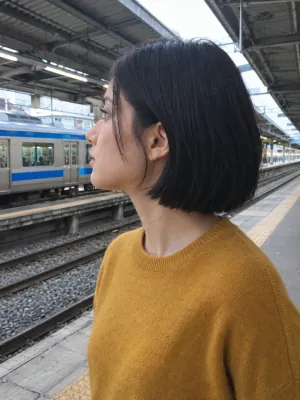
Avoid: Side profile
Avoid: Group photo

Avoid: Dark or backlit
Use photos you’re allowed to use, of adults only, and ask the person in photo 1 before you post their zombie video. A front-facing daylight photo keeps the likeness best: no sunglasses, one face per photo. No two renders come out exactly alike, so a second try can look different.
Private photos Deleted automatically after 30 days.
Failed renders cost nothing The credits go back on their own.
One-time payments No subscription. Nothing renews.
Google sign-in Email works too; the free preview needs Google.
AI zombie trend FAQ
What is the AI zombie trend?
A TikTok and Reels format from autumn 2026: someone you love, or your pet, appears as a zombie on an empty street, the survivor is scared at first, then recognises them, and instead of an attack there is a long hug and a warm memory. It starts scary and ends sweet, which is why people share it with the person in the video.
How do I do the AI zombie trend?
Add a photo of the person or pet who turns, add your own photo if you want to be in it, and press make. The 15-second video is ready in about 5 minutes. Add a sound when you post.
Can my dog or cat be the zombie?
Yes, and it is one of the most loved versions. Put your pet in photo 1. It stays a real animal on four legs with glowing white eyes and dark, matted fur, growls for a moment, then leaps into your arms.
Is it scary or gory?
A little scary, never gory. For a few seconds the zombie looks frightening, with glowing white eyes, grey skin and bared teeth, but there is no blood, no wounds and no bite. The story ends in a hug and a sunny memory, which is the point of the trend.
Do I need Dreamina, CapCut or a prompt?
No. It runs in the browser on your phone or computer. The street, the five shots and the memory are already written; you only add a photo.
What music does it use?
Its own original score: soft piano, strings and rain, with no singing. To match a post you like, pick its sound in TikTok and turn ours down.
Can I do it with only one photo?
Yes. With one photo, the person or pet in it turns and hugs a survivor who is shown from behind. Add a second photo of yourself to see your own face in the hug. Either way the story, the light and the memory at the end are the same.
How long is it and what does it cost?
Fifteen seconds, vertical 9:16. At the default quality it’s 13 credits, $7.99 as a single video or about $3.90 out of a credit pack. A failed render returns its credits on its own.
Someone you would still hug
One photo and one tap, and your AI zombie trend video is on its way.