Two cards, one swipe, and a car appears behind you
24 Car Trend AI: Make the Unforgettable Car Reveal With Your Photo (or Your Own Car)
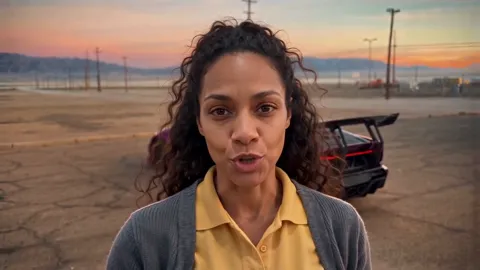
24 Car Trend AI puts you in the viral card-swipe reveal, also called the Unforgettable car trend. You hold the “2” and “4” cards to the lens, sweep your arm across it, and a purple supercar is parked behind you. Add a photo of your car and yours appears instead. About 11 seconds with the song, widescreen 16:9 or vertical 9:16, in 480p, 720p or 1080p.
720p is $9.99, or use a credit pack


Real result · tap for sound“One photo”
- From $6.99; 720p is $9.99
- Allow about 15 minutes
- Failed renders cost nothing
24 car trend AI examples
Two actual 720p results, each shown next to the photos it started from: one photo of a woman for the purple supercar, and a photo of a man plus a photo of his SUV for the own-car version. Tap a card for sound. Every face and car here is AI-generated.
How to make a 24 car trend AI video
The parking lot, the cards, the swipe and the timing of the 24 car trend are already set. You bring a photo, and a photo of your car if you want yours in it.
Step 1: Pick the car
Keep the purple supercar, or pick Your own car to swap in the car you drive or dream about.
Step 2: Add your photos
One clear photo of one adult, face to the camera. For your own car, add a second photo with the whole car in view: a car, SUV, pickup or van.
Step 3: Pick the size and pay
Keep 16:9 for the original look or pick 9:16 for TikTok and Reels, and choose 480p, 720p or 1080p. You see the price before you pay; there is no free preview.
Step 4: Watch and post
Allow about 15 minutes; we email you if you close the tab. The song is already in your video.
Our stopwatch. Allow about 15 minutes from starting your video to the finished file with the song; 1080p and busy queues can take longer.
720p is $9.99, or use a credit pack
The 24 car trend reveal, second by second
0–3 s · the cards
You turn to the camera, say a few words, then fan the “2” and “4” cards in front of the lens.
3–4 s · the swipe
Your arm sweeps across the lens, the frame blurs, and the car is parked behind you when it clears.
4–11 s · the flex
You look back and point at the car, talk to the camera, flick the cards and finish with both hands on your head.
Every 24 car trend video keeps the same beats, because the timing sells the trick. The cards must read 24, upright and not mirrored, and the car must not be there before the swipe.
We made the scene with our own AI stand-in and a purple supercar we designed, with no real badge on it, and swap you in. No frame of the original 24 car trend post or of anyone else’s clip is in your video.
Put your own car in the 24 car trend

- Lyrics written for your topic
- Two voices, lip-synced
- Pushes in closer at 0:05
- 720p · 9:16 vertical
- 12 seconds, 6 lines
In the 24 car trend, pick Your own car and add a photo of it: the purple supercar is replaced with your car in every frame after the reveal, with its colour, shape and wheels. A family SUV works as well as a dream car.
Be honest with yourself about the limits. The AI may draw your car’s real badge or lettering back on, because it is your car. Your face is kept from the photo, but a big expression near the end can soften it for a moment.
Use one photo of the car outside in daylight, from the front or side, with the whole car in view.
| Tier | Sharpest | Credits, 12 s at 720p |
|---|---|---|
| Standard Seedance 2.0 Mini | 720p | 10 |
| Fast Seedance 2.0 Fast | 720p | 17 |
| Pro Seedance 2.0 | 1080p | 20 |
| Ultra Seedance 2.5 | 1080p | 37 |
Every tier offers 5, 8, 10, 12 or 15 seconds in 9:16, 1:1 or 16:9.
24 car trend AI prices and resolutions
One video
$9.99
- Pay once for the video you make
- No subscription, nothing renews
- Failed renders cost nothing
Credit packs
from $29
- 100 credits to start
- A default video is 30 credits
- Credits never expire
720p is $9.99, or use a credit pack
A single video costs $6.99 at 480p, $9.99 at 720p or $14.99 at 1080p: 20, 30 or 45 credits. The page starts at 720p. The purple supercar and your own car cost the same, and 16:9 and 9:16 cost the same.
You can buy one video or use a credit pack from $29 for 100 credits. There is no subscription. See all prices.
If a photo is turned away or the video fails, the credits go back to your balance for another try. A video that finishes but that you don’t like isn’t a failed one, so watch the examples first. The refund policy covers cash refunds.
Before you upload to the 24 car trend

Works: One person, straight on, even light

Avoid: Sunglasses

Avoid: Side profile
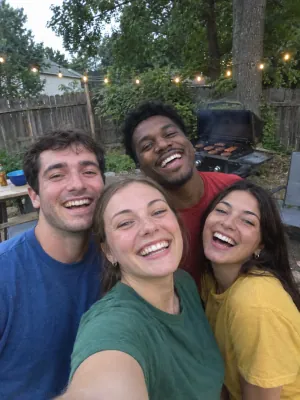
Avoid: Group photo

Avoid: Dark or backlit
Use photos you’re allowed to use: one adult, and a car you may show. Photos of children are turned away. Your photos are stored privately and deleted automatically after 30 days; finished videos stay in My videos, visible only to you.
This page is a fan-made take on the viral 24 car trend. It is not affiliated with, endorsed by or connected to French Montana, Mattel or UNO, or the creator of the original video. The cards are plain green number cards and the default car is our own design. The song in your video belongs to its owners, so follow the music rules of the app you post on. Rights holders can reach us at support@airapduo.io, and we take content down on request. Want another car stunt? Try Flying Car AI.
Private photos Deleted automatically after 30 days.
Failed renders cost nothing The credits go back on their own.
One-time payments No subscription. Nothing renews.
Secure checkout Paid through Stripe. We never see your card.
24 car trend AI FAQ
What is the 24 car trend?
A viral clip where someone holds two cards, a 2 and a 4, up to the camera, swipes them across the lens, and a supercar is suddenly parked behind them. It is also called the Unforgettable car trend after the song under it, or the UNO car trend after the green cards.
How much does it cost, and which quality should I pick?
480p is $6.99, 720p is $9.99 and 1080p is $14.99, or 20, 30 or 45 credits from a pack. 720p is the default and looks sharp on a phone; pick 1080p for a bigger screen. There is no free preview; the examples above are actual results.
Which photo do I need?
One clear photo of one adult, face to the camera, wearing what you want to wear in the video. A selfie or a waist-up photo works. Group photos, pets and photos of children are not supported.
Can I use my own car?
Yes. Pick Your own car and add a second photo of it, with the whole car in view. Cars, SUVs, pickups and vans all work. The AI keeps its colour, shape and wheels, and your car takes the place of the purple supercar.
Is this the real video?
No. Every frame is AI-generated from our own stand-in clip. Nothing comes from the original post, the purple supercar is not a real model, and the cards are plain number cards.
Can I make it vertical for TikTok?
Yes. The 24 car trend is shot widescreen, so 16:9 is the default. Pick 9:16 and we place the widescreen video in a vertical frame with a soft blurred background, ready for TikTok, Reels and Shorts.
What if the video fails?
The credits go back to your balance on their own. A photo that is turned away is stopped before the video is made, so you can try another one. The refund policy covers cash refunds.
What happens to my photos?
They are stored privately and deleted automatically after 30 days. Your finished video stays in My videos, visible only to you, until you delete your account.
Your turn to do the 24 car trend
One photo, two cards, one swipe, and your 24 car trend AI video is on its way.