The fan transition trend
Ceiling Fan Outfit Change AI
Add a photo and we make your ceiling fan outfit change: the camera looks straight down from the ceiling, you lie on the rug, and every time a fan blade sweeps past the lens you are wearing a new look. Four outfits in 15 seconds, from a cozy sweater to red velvet. Add your partner or your dog if you like. Ready in about 5 minutes.
$4.99 a video, or about $3.90 each in a credit pack

Real result · tap for sound“One photo”
- $4.99 a video, or about $3.90 each in a credit pack
- Ready in about 5 minutes
- Failed renders cost nothing
Ceiling fan outfit change AI examples
Each fan transition below started as one or two photos. The room, the ceiling fan and all four outfits came from the AI. Tap a card for sound. Every face here is AI-generated.
Just you
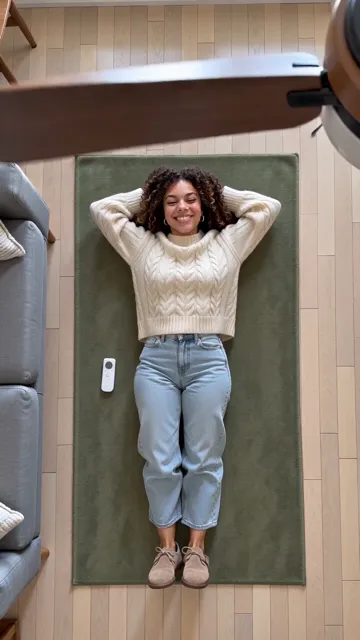
From one photo: she lies on a green rug under a ceiling fan and clicks the remote, and every blade swaps her look: a cream sweater, a camel coat, a white shirt, then red velvet and a wink.
Make one like thisA couple
Two photos: they lie side by side under the fan and change together into matching camel coats, white shirts and red velvet blazers; on the first blade only she gets the cream sweater.
Make one like thisYou and your dog
She lies on the rug with her golden retriever; at each blade they both change, from matching cream knits to a camel coat and a navy dog coat, and on the last blade she slips back to the white shirt as her dog gets its velvet.
Make one like this
How to make a ceiling fan outfit change AI video
Three steps, and only the first one needs you. The stopwatch is our own timing, not a promise. Would rather write the prompt yourself? The ceiling fan transition AI prompt guide has copy-ready prompts.
Step 1: Add your photo
One clear, front-facing photo of you, or of your dog or cat. Want company? Add a second photo of your partner, a friend or your pet.
Step 2: Make it and wait
Press make. Most videos finish in about 5 minutes, and we email you if you close the tab.
Step 3: Post it with a sound
The video comes with its own upbeat tune. Most people post their fan transition on TikTok or Reels with a trending sound and turn ours down.
Our stopwatch. Timed on the video model, from starting the task to the finished video: our five test videos at 15 seconds and 9:16 took 2 min 44 s to 3 min 30 s.
$4.99 a video, or about $3.90 each in a credit pack
Inside a ceiling fan outfit change AI video: one shot, four looks
The start
Your own clothes from the photo, a smile up at the camera and a click of the remote.
Look 1 and 2
A chunky cream cable-knit sweater with light jeans, then a long camel coat over a black turtleneck.
Look 3
A crisp white shirt tucked into black trousers, with black loafers.
The last look
A deep-red velvet blazer over all black, and a wink at the camera while the fan keeps turning.
The trend is filmed from a phone fixed to the ceiling, looking straight down past a turning fan. You lie on the rug, point the remote, and each time a blade covers the lens you come back in a new outfit. We kept that exact shot: no cuts, no camera moves, the room never changes.
You keep your own face, hair and skin tone in every look. Only the clothes change, and every piece is a solid colour with no logos, so it reads clearly from above.
Just you, you two, or you and your pet
Just you
One photo: four outfits, one wink.
A couple or two friends
Two photos: you lie side by side and change into matching looks together.
You and your dog or cat
Your pet lies beside you and gets its own little outfit each time: a knit sweater, a navy coat, a black vest, red velvet.
Just your pet
Your dog or cat gets the whole runway to itself.
Most fan transition tools stop at one person. Our ceiling fan outfit change AI lies you down next to whoever you like, and each person keeps their own face.
Ceiling fan outfit change AI options, compared
Search for the fan transition and you will find three kinds of result. Here is what each gives you.
| This page | A prompt in a video app | One-tap templates | |
|---|---|---|---|
| You get | A 15-second video with sound | Whatever the model makes of the prompt | A short clip |
| The shot | Overhead, lying on the rug, the fan blades swap the outfits | Depends on your prompt | Often filmed from the front |
| Outfits | Four set looks, solid colours, no logos | You describe them, or add outfit photos | Random or a few presets |
| Couples and pets | Yes | With the right prompt | Rarely |
| Cost | $4.99, or about $3.90 in a credit pack | App credits or a subscription | Free trial, then credits |
Checked on 8 October 2026 against each kind of product’s own pages.
Is the ceiling fan outfit change AI free?
One video
$4.99
- Pay once for the video you make
- No subscription, nothing renews
- Failed renders cost nothing
Credit packs
from $14.99
- 50 credits to start
- A default video is 13 credits
- Credits never expire
$4.99 a video, or about $3.90 each in a credit pack
No. You pay once for the video you make, and you see the price before you pay. The copy-ready prompts in our guide are free if you would rather use your own video app.
The 15-second fan transition is 13 credits at the default quality, $4.99 on its own, or out of a credit pack from $14.99. No subscription, and a failed render costs nothing. See every price.
Before you upload

Works: One person, straight on, even light

Avoid: Sunglasses

Avoid: Side profile

Avoid: Group photo

Avoid: Dark or backlit
Use photos you’re allowed to use, of adults only; photos of children are turned away. The outfits are fixed for now. Now and then one person skips a look, or the last look slips back to an earlier outfit for the final seconds; our couple and dog examples both show it. A front-facing daylight photo keeps the likeness best: no sunglasses, one face per photo. Want another one-photo trend? In the car jump AI video an SUV flies over you in the desert.
Private photos Deleted automatically after 30 days.
Failed renders cost nothing The credits go back on their own.
One-time payments No subscription. Nothing renews.
Secure checkout Paid through Stripe. We never see your card.
Ceiling fan outfit change AI FAQ
What is the ceiling fan outfit change trend?
A TikTok trend from late September 2026, also called the fan transition or the under-the-fan trend. A phone on the ceiling films someone lying on the floor under a ceiling fan, and every time a blade sweeps past the lens their outfit changes. The first ones were filmed and edited by hand; most are now made with AI.
Can we make fan transition reels with AI?
Yes. Add one photo here and the AI makes the whole clip: the overhead shot, the turning fan and four outfit changes, as a vertical MP4 ready for Reels or TikTok.
Do I need a real ceiling fan or a full-body photo?
Neither. The room and the fan are made by the AI, and a clear upper-body photo is enough; the AI draws the rest of you in every outfit.
Can I choose the outfits?
Not yet: every video goes from a cream sweater and jeans to a camel coat, a white shirt and a red velvet blazer. Want your own clothes in it? Our prompt guide shows how to give a video app your own outfit photos.
Can two people or my dog do it together?
Yes. Add a second photo of your partner, a friend or your pet. Two people change into matching looks, usually at the same moment; a pet stays a real animal and gets its own little outfits.
Will it still look like me?
Yes. Your face, hair and skin tone stay as they are in your photo in all four looks; only the clothes change.
How is this different from other ceiling fan outfit change AI tools?
Many ceiling fan outfit change AI tools film you standing, from the front. Ours keeps the overhead shot of the original trend, with you lying under the fan, and takes a second photo, so couples and pets work too.
How long is it and what does it cost?
Fifteen seconds, vertical 9:16. At the default quality it’s 13 credits, $4.99 as a single video or about $3.90 out of a credit pack. A failed render returns its credits on its own.
Switch the fan on
One photo and one tap, and your fan transition is on its way.